
XMUT103
Assignment 1: Lists and Stacks
 Due 28 March , 19 pm
 Download the zip file and unpack it.
⚠️
Download the zip file and unpack it.
⚠️ To submit
- DeShredder.java
- Sokoban.java (and any additional files you change or create for Sokoban)
-
Do not rename the provided template files. This is important for the submission system to recognize your files correctly. -
You must use the provided template file and not remove or change the This ensures that the tutors can mark your work.setupGUIandmainmethods. -
Make sure all your files compile correctly before submitting. Files that do not compile may result in a zero mark for that question. - To submit your assignment, use this link.
Part 1: DeShredder (Weight: 2/3)
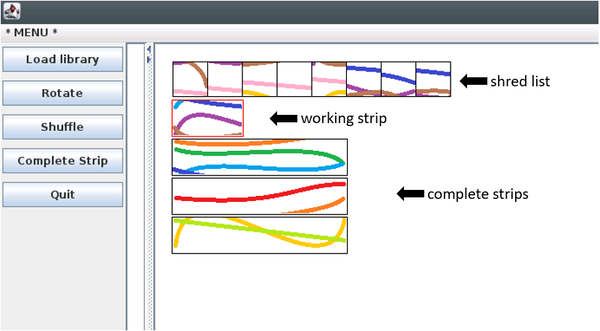
Complete a program that allows a user to reconstruct an image of a document from a collection of image “shreds” (small square sections of the image). The process involves two main steps:- Arranging shreds into horizontal strips
- Ordering the strips so as to form the complete image
1.png, 2.png, 3.png, ..., one
for each shred. For each image, it creates a Shred object,
adds it to a list, and displays the list of all shreds along the top of the
window.
User Interaction:
- Drag shreds from the top list into the “working strip” below.
- Rearrange shreds within the working strip or return them to the top list.
- Once a strip is complete, click “Complete Strip” to move it to the list of completed strips below.
- Completed strips can be reordered or dragged back to the working strip for editing.
 The assignment directory includes three folders of shred images:
 -
shreds0contains an image with coloured lines – best for initial testing -
shreds1andshreds2contain parts of screenshots of a program.
 To load a set of shreds, select the first image file in the folder
(e.g., 1.png). The program will automatically load the remaining files in
that directory. This is the default behaviour.
Most of the graphical interface has already been implemented for you, including:
To load a set of shreds, select the first image file in the folder
(e.g., 1.png). The program will automatically load the remaining files in
that directory. This is the default behaviour.
Most of the graphical interface has already been implemented for you, including: -
setupGUI()to create buttons and set up mouse interaction -
display()to draw the list ofShredon the window - Parts of
doMouse(...)to handle mouse events
Core (70%)
Complete the load(Path dir, int count) method to
create a list of all Shred objects from the specified directory
(dir), which contains count shreds as follows:
- Empty out all the current lists (the list of all shreds, the working strip, and the list of completed strips).
- Create a Shred object for each image (1...count) and put the Shreds into the
allShredslist. - Note that the constructor for Shred class needs the directory name and the number/id of the shred. (It doesn't load or draw the actual image)
Complete the rotateList() method to rotate the
list of all shreds one step to the left, allowing the user to view all
shreds in the list.
Complete the doMouse(...) method and define any additional helper methods needed to:
- Move shreds from the main list into the working strip
- Reorder shreds within the working strip
- Move shreds back from the working strip to the list of all shreds
Tips and Suggestions for Implementing doMouse(...) - When the user drags the mouse, the
doMousemethod must determine both the strip and the column where the mouse was pressed and where it was released. To do this, it uses the providedgetStrip(y)andgetColumn(x)methods. These have already been implemented for you and must not be modified. - It then has to do the appropriate move, depending on the strips. There are three different cases that your code has to deal with for the core:
- move a Shred from
allShredsto a position in the working strip - move a Shred from the working strip back into
allShreds - move a Shred around within the working strip.
- move a Shred from
- Moving a shred to a position past the end of a List should put it at the end.
- Create additional methods for each action — do not put all the logic inside
doMouse, as this reduces clarity and may cost you marks. - Attempting an invalid action should have no effect.
Completion (20%)
Complete the shuffleList() method to enable the user to shuffle the allShreds list.
Complete the completeStrip method to move the current working strip to the end of the list of completed strips, and then initialise a new, empty working strip.
Allow the user to reorder the completed strips and move a completed strip back into the working strip, provided the working strip is currently empty. This will require extending doMouse and likely writing some additional methods.
Ensure that the program remains robust — it must not throw exceptions or lose data, regardless of where the user presses or releases the mouse. For example, it should handle the following cases without crashing: - There are no Shreds in a list, or
- The user tries to select (or move) a shred from beyond the ends of the list, or
- The user tries to move a non-existent completed strip, or
- The user tries to move a completed strip on top of a non-empty working strip.
Challenge (10%)
Extend the program to allow the user to save the completed
strips as a reconstructed document in a single image file.
You may find the loadImage(...) and saveImage(...) methods helpful for this task.
If the strips are not all the same length, allow the user to pad shorter strips on the left or right with white squares as needed.
Enhance the program to assist the user by highlighting shreds
that are likely neighbours of the last shred in the working strip. A shred
s1 may be a neighbour of shred s2 if the colours
of the pixels on one side of s1 closely match those on the complementary
side of s2.
Note that an exact pixel match is unlikely—you will need to define what qualifies as a good match, which may differ for coloured images and text-based documents.
Part 2: Undo for Sokoban (Weight: 1/3)
Sokoban ("Tui xiang zi" in Chinese) is a puzzle game created in 1980, and is available on many computer platforms. The game involves controlling a worker in a warehouse who has to push boxes around the warehouse to get them onto their destination spots. The worker can only push one box at a time, and cannot pull boxes. It is easy for the player to get stuck in a deadlock where it is no longer possible to move some of the boxes. We have provided a simple implementation of theSokoban game
with four levels. You can control the worker with buttons or keyboard keys.
For this assignment, you need to add an undo button to Sokoban.
It should use a Stack to track the history of actions during
the current level. Each time the player performs a successful action, it
should be recorded on the stack. Whenever the undo button is clicked,
the program should pop the top action from the stack and reverse ("undo")
it: if it was a move, the worker should be moved back in the opposite
direction; if it was a push, both the worker and the pushed box should be
moved back.
⚠️ The amount of code you need to write is relatively small, but
understanding what’s required and where to place it will require you to
thoroughly read the Sokoban program. This may take time, so be prepared to
spend time carefully going through the code.
Core (70%)
Implement Undo for Sokoban.
To help you implement the undo functionality, we have provided an
ActionRecord class for recording information about actions.
You need to: - Add a
historyfield that holds aStackofActionRecordobjects. - Add extra code in the methods that perform the actions to create an
ActionRecordobject and push it on the history stack. - Update the
loadmethod to clear the history stack when the level is reset. - Add an Undo button (and optionally, a key mapping for u to trigger the undo).
- Implement an undo method that pops the top
ActionRecordfrom the stack and reverses the action. This method should be called when the Undo button is clicked.
Completion (20%)
Implement a Redo function. When the user presses Undo,
the program should pop the top ActionRecord from the history
stack, reverse the action, and push it onto a redo stack.
When the user presses the Redo button, the program should pop the top
ActionRecord from the redo stack, redo the action, and push
it back onto the history stack.
The player can use this to undo all actions back to the start of the level, and then redo them to replay the moves.
Challenge (10%)
One of the more frustrating parts of Sokoban is having to move the worker across the puzzle to reach the next box to push. Add a feature that lets the player click on any free cell. If there is a clear path from the worker's current position to that cell, the worker should automatically follow the path. This involves searching for a route through the empty cells of the warehouse and then making the worker step along that route.As a starting point, you can support only straight-line paths. The full version should find any valid free path through the warehouse.