XMUT103
Assignment 2: Using Collections

Due 11 April , 19 pm

Download the
zip file and unpack it.
⚠️
Remember to adhere to the Programming Style Guide.
To submit
- WellingtonTrains.java, Station.java, TrainLine.java, TrainService.java
- Pencil.java, and any other classes you made for the Pencil program
⚠️
Important Instructions
- Do not rename the provided template files. This is important for the submission system to recognize your files correctly.
- You must use the provided template file and not remove or change the
setupGUI and main methods. This ensures that the tutors can mark your work.
- Make sure all your files compile correctly before submitting. Files that do not compile may result in a zero mark for that question.
- To submit your assignment, use this link.
Part 1: Wellington Trains (Weight: 60%)
WellingtonTrains is a program that answers queries about Wellington
train stations, train lines, and the timetables for services on those lines.
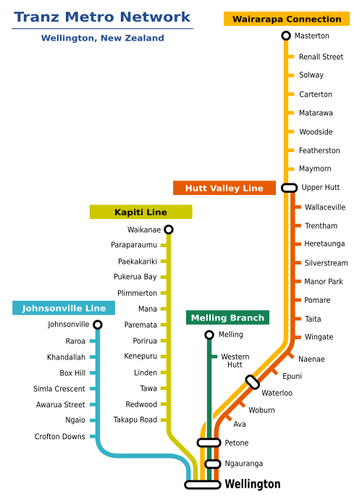
There are five train lines in the Wellington railway system. The image shows each line in a different colour. All lines connect Wellington to other destinations.
In this assignment, we treat the inbound and outbound directions as two separate lines. For example, the Wellington_Johnsonville line is different from the Johnsonville_Wellington line. They have the same stations, but the order of stations is reversed.
Stations, Lines, and Services
Your program manages three types of information:
- Stations: These are the stops along the lines. Each station has a unique name, a zone, its coordinates on the map, and a set of train lines that pass through the station.
- Train Lines: Each train line is a sequence of stations along the line. For example, the Wellington_Johnsonville line, which starts at Wellington station, and ends at Johnsonville station, with 7 stations in between. To make things easier, we treat the inbound and outbound as two separate train lines. There is therefore a Wellington_Melling line which is different from the Melling_Wellington line. (They have the same stations, but in reverse order.)
- Train Services: a schedule/timetable for a particular train running on a given train line.
For example, the 11:32 train on the Wellington_Johnsonville line that leaves Wellington station at 11:32, leaves Crofton-Downs at 11:40, ... and reaches the final station, Johnsonville at 11:55.
A Train Service is specified by a sequence of times - the time that the train leaves the first station, followed by the times that the train gets to each of the remaining stations on the line. If a train doesn't stop at a station, the corresponding time will be -1.
Data Files
First, you need to understand the data files in the
data subdirectory. These files contain the information your program must load and use.
-
data/stations.data contains each station in the railway system with its name, fare zone, and location on the map.
Wellington 1 110 420 Wellington station is in fare zone 1 and is at point (110, 420) on the map.
Ngauranga 3 136 389 Ngauranga station is in fare zone 3 and is at point (136, 389) on the map.
-
data/train-lines.data contains the names of all the train lines. Each name consists of the start and end stations, separated by an underscore.
Johnsonville_Wellington The train line with name "Johnsonville_Wellington" starts at Johnsonville station and ends at Wellington station.
Wellington_Johnsonville The train line with name "Wellington_Johnsonville" starts at Wellington station and ends at Johnsonville station (different from the Johnsonville_Wellington line).
- For each train line, there are two files:
-
xxx_xxx-stations.data contains the sequence of stations on the train line.
Upper-Hutt_Wellington-stations.data: This train line has 17 stations. The first station is Upper Hutt, and the last station is Wellington.
-
xxx_xxx-services.data contains services (timetable) information. Each line shows the sequence of times for one train service on the train line.
Upper-Hutt_Wellington-services.data: There are 54 train services per day from Upper Hutt to Wellington. The file contains 54 lines of data, one line for each service.
530 532 535 537 539 542 544 546 549 551 553 555 558 601 603 609 615
The train leaves Upper Hutt at 5:30am, leaves the second station (Wallaceville) at 5:32am, and arrives at Wellington at 6:15am.
600 602 605 607 610 612 615 617 -1 -1 -1 622 -1 -1 -1 -1 638
The train leaves Upper Hutt at 6:00am. It does not stop at the 9th (Wingate), 10th, 11th, 13th, 14th, 15th, and 16th (Ngauranga) stations, and arrives at Wellington at 6:38.
Java Classes and Data Structures
We have provided Java Classes for
Station,
TrainLine, and
TrainService objects to store information about individual stations,
train lines, and train services.
- Station: store information about individual stations and a collection of the TrainLines that pass through that station.
- TrainLine: stores the name of the TrainLine, the List of Stations on the line and a list of TrainServices running on the line.
- TrainServices: Stores the TrainLine attached to this and a list of times that the train leaves each station along the line. [Completion only]
You will need to complete
WellingtonTrains. It contains a
main method, a
loadData method, and a
setupGUI method to create the user interface.
Your
WellingtonTrains program will need to load the data from the files into data structures inside the program. A sensible way to organise the data is to have:
- a collection of
Stations (a Map indexed by the names of the stations)
- a collection of
TrainLines (a Map indexed by the names of the train lines names)

For the Core of the assignment, you do not have to worry about the Services - just the Stations and TrainLines.
Note that
- a
TrainLine contains a collection of the TrainServices on that line, as well as a List of Stations.
- a
Station contains a collection of the TrainLines that pass through that station.
Suggested Algorithms for loading the data
To Create the Map of Stations:
- Read the data from
data/stations.data.
- For each line in the data:
- construct a
Station object using the data on that line.
- add the
Station to the Map of Stations, indexed by station's name. (The Station objects won't have any any TrainLine information at this point.)
To Create the Map of TrainLines:
- Read the list of train line names from
data/train-lines.data.
- For each train line name:
- Construct a
TrainLine object.
- Add the
TrainLine object to the Map of TrainLines.
- For each station name in
data/XXX_YYY-stations.data:
- Find the correponding
Station object in the Map of Stations.
- Add the
Station object to the stations in the TrainLine object.
- Add the
TrainLine object to the train lines in the Station object.
To Load the Train Service (timetable) information: [Completion only]
- Read the list of train line names from
data/train-lines.data.
- For each train line name:
- Read the corresponding
data/XXX_YYY-services.data file.
- For each line (sequence of times) in the file:
- Construct a
TrainService object.
- Add the
TrainService object to the relevant TrainLine object.
- For each time in the sequence, add the time to the
TrainService object.
Hints
- Examine the data files carefully to understand their contents.
- Read the
Station.java, TrainLine.java, and TrainService.java classes thoroughly to understand how to use them. Using the Documentation view in BlueJ might be helpful.
- Sketch a diagram of the data structures, showing the Maps, a couple of
Station objects, a couple of TrainLine objects, and a TrainService object (with all their fields), to ensure you know how they are all related.
Core (70%)
Make your WellingtonTrains program load the data from the files into the Map of Stations and the Map of TrainLines.
Make your program answer these 6 queries:
- List all stations: Print the names of all stations in the region.
- Alphabetical list: Print all station names in alphabetical order.
- List all lines: Print the names of all the train lines in the region.
- Lines at a station: Print all the train lines that pass through the given station.
- Stations on a line: Print all the stations along the given train line.
- Check connection: Determine if a train line links the first station to the destination station.
 Ensure the first station occurs before the destination in the line’s station sequence.
Report if no connection exists; otherwise, print the train line’s name.
Completion (20%)
Make your program load the
Train Service data (timetable) from the files into the data structures .
Make your program answer these 3 additional queries:
- Next service: Print the next train service for each line at the station after the specified time.
- Trip with time: Find a trip between two stations (on the same line), after the specified time.
Note: For a valid trip, print the train line, the departure time from the first station, the arrival time at the destination, and the number of fare zones the trip passes through.
If no trip is available, report that no service leaves at or after the specified time.
- Closest stations: Find the 10 closest stations to a point clicked on the map.
Note: List the names and distances from closest to furthest. This requires responding to the mouse.
Challenge (10%)
Make your program find the best trip (earliest arrival) between a starting station and a destination station. If the trip requires two train lines (e.g: from Tawa to Ngaio), print out the starting time, the first train line, the exchange station, the arriving and departing times at the exchange station, the second train line, and the arrival time at the destination, and the total number of fare zones.
Part 2: Pencil (Weight: 40%)
The
Pencil program is a simple drawing application that allows users to draw freehand lines on the graphics pane using a "pencil" tool.
Each drawing consists of a collection of strokes. A stroke is created when the user presses the mouse button, moves the mouse to draw, and then releases the button. The stroke follows the path between the point where the mouse was pressed and where it was released.
You are to add an
undo and
redo facility to Pencil. The
undo button should remove strokes from the drawing, one at a time, from the most recently added back to the first stroke. The
redo button should "undo the undo", by putting strokes back into the drawing after they have been undone. If the user draws a new stroke after doing an undo or redo, the program will "forget" all the strokes that have been undone.
This is similar to the Sokoban program in Assignment 1, but you will have to do more work than Sokoban to make the
undo work. You will almost certainly need to create a class to represent strokes, and you may need to change the way the program works.
Core (70%)
Add the ability to undo strokes.
Completion (20%)
Add the ability to redo strokes that have been undone, and to undo and redo them repeatedly, as long as no new strokes have been created since the undo action.
Challenge (10%)
Add the ability to change the pen colour and width, ensuring that undoing a stroke restores the previous colour and width. For example, if a user draws three black strokes, then switches to red and draws two red strokes, undoing the two red strokes should revert the pen colour back to black.
