XMUT103
Assignment 3: Using Collections and Recursion

Due 2 May , 19 pm

Download the
zip file and unpack it.
⚠️
Remember to adhere to the Programming Style Guide.
To submit
- HospitalERCore.java
- Patient.java
- HospitalERCompl.java (for the Hospital ER completion)
- Department.java (for the Hospital ER completion)
- MineSweeper.java
⚠️
Important Instructions
- Do not rename the provided template files. This is important for the submission system to recognize your files correctly.
- You must use the provided template file and not remove or change the
setupGUI and main methods. This ensures that the tutors can mark your work.
- Make sure all your files compile correctly before submitting. Files that do not compile may result in a zero mark for that question.
- To submit your assignment, use this link.
Part 1: Hospital ER (Weight: 70%)
⚠️ The specification of this program is quite long and
detailed. Read it carefully! You cannot do this assignment just based
on comments in the template code.
The
HospitalER program is a tick-based simulation of patients arriving
at a hospital’s emergency room. Patients arrive, wait for treatment,
receive treatment, and are then discharged.
- For the core version, there is just one waiting room and one treatment room, and patients only need one treatment.
- For the completion version, patients move through a series of treatments across different departments (e.g. ER, X-Ray, MRI, Surgery, etc). Each department has its own waiting and treatment rooms. Once a patient has completed all their required treatments, they are discharged.
A treatment room can only accommodate a fixed number of patients at any one
time. If the room is full, any new patients arriving for that treatment must
wait in the corresponding waiting room until a space becomes available.
Patients are assigned a priority level when they arrive at the emergency department, ranging from 1 (highest priority) to 3 (lowest).
Note, this program is related to the
MedicalCenter program in the
lectures, but is more complex.
Classes
The Core version of the program has four classes:
-
HospitalERCore which contains
- fields to store collections of
Patients for the waiting room and the treatment room, fields to record simulation statistics, and fields for simulation parameters.
- the
main() and setupGUI() methods (completed for you).
- a
reset(...) method (to be completed) that resets the simulation, including the waiting room, the treatment room, and all statistical fields.
- a
run() method (to be completed) for controlling the simulation.
- several pre-written methods are provided, including
setupGUI() and redraw(). The redraw() method is responsible for visualising the current state of the simulation.
-
Patient [almost complete] which contains information about an individual patient. It includes the treatment plan: a sequence of treatments the patient requires, along with the duration of each treatment. Note that the core version only considers the first treatment in the plan and ignores all subsequent ones.
The Patient object keeps track of the current treatment - the treatment they are currently undergoing (or are about to start) and the remaining time for that treatment.
It has methods for accessing fields, comparing Patients [incomplete], and drawing Patients
It has methods for moving the Patient through the simulation:
-
waitForATick(): makes patient wait for one tick.
-
advanceCurrentTreatmentByTick(): removes one time tick from the remaining time for the current treatment.
-
currentTreatmentFinished(): whether the Patient has finished their current treatment.
-
removeCurrentTreatment(): [completion] Remove the current treatment from the queue of treatments the Patient needs.
-
getCurrentDepartment(): [completion] gets the name of the department for the current (or about-to-start) treatment.
-
allTreatmentsCompleted(): [completion] whether the Patient has completed all their treatments.
-
Treatment [complete] which is a small class that describes a treatment, including the name of the department where it will take place and the remaining duration. Each Patient contains a queue of Treatments they need to undergo.
-
PatientGenerator [complete] which generates new random patients, each with a random name, priority, and treatment plan.
- It has a static method
getNextPatient(), which returns a new Patient object with randomly generated values, or null if no new patient has arrived during that tick.
The Completion version of the program has five classes
-
Patient, Treatment, and PatientGenerator, just as in the core.
-
HospitalERCompl [incomplete] which contains
- a field containing a collection of
Department objects, representing the various treatment centres in the hospital.
- The same methods as the core version, though the
reset(...) and run() methods must be extended to handle multiple departments and more complex logic.
-
Department [incomplete] which contains information about a single department in the hospital. It will need:
- Fields to hold
- The Set of patients currently being treated.
- The maximum number of patients the department can treat at once.
- The Queue of patients waiting to be treated.
- Methods to
- Add a patient to the department.
- Return the collection of waiting patients.
- Return the collection of patients being treated.
- Move patients from the waiting room to the treatment area, if there is available space.
- Remove a patient from the department once they have completed their treatment.
- The method to draw a graphical representation of the patients in the department is already completed for you.
Note that the GUI of both versions of
HospitalER includes four buttons -
"Reset (Queue)" and "Reset (Pri Queue)" for resetting, "Start" for running, and "Pause & Report" for pausing the simulation. It also features sliders to control some of the simulation parameters, such as the speed of the simulation, how often new patients arrive, and the relative frequency of the different priority patients.
Core:
Complete the
HospitalERCore class and the
compareTo method in the
Patient class so that the program can simulate the flow of patients through the emergency room, and reports on basic statistics.
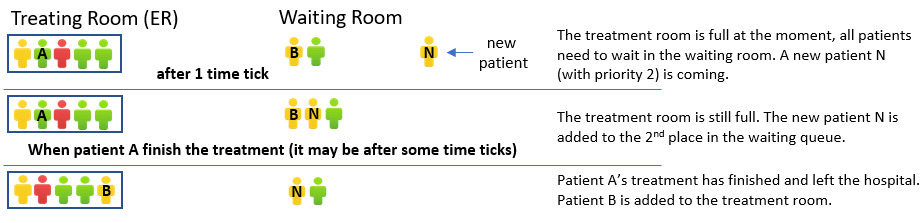
The following image shows what the hospital might look like when a new patient (N) arrives, after they have been placed in the waiting room, and later when patient A completes their treatment.
Complete the
reset method to initialise
waitingRoom as a queue of patients and
treatmentRoom as a set of Patients.
Complete the
run method. Each loop of the run() method represents one tick of time. The method should:
- Advance the time by one "tick".
- Find and discharge all patients in the treatment room who have finished their treatment by removing them from the room and printing a message:
UI.println(time + ": Discharge: " + p);
- Process one time tick for each patient currently being treated or waiting in the waiting room.
- Move patients from the waiting room to the treatment room, if space is available.
- Get any new patient that has arrived and add them to the waiting room [complete].
- Display the state of the waiting room and treatment room [complete].
Add fields to record basic statistics, update these statistics in the
run() method
whenever a patient is discharged, and complete the
reportStatistics() method to report:
- The total number of patients treated
- The average waiting time of patients
Make the waiting room act as a priority queue based on patient priority by doing the following:
- Extend the
reset method to use a Priority Queue if the argument is true, and a regular Queue if the argument is false.
- Complete the
compareTo method in the Patient class so that:
- A patient with a higher priority is ordered before a patient with lower priority.
- Patients with equal priority are ordered by their time of arrival.
- Add fields to track priority 1 statistics, and modify the
run() and reportStatistics() methods to also report:
- The total number of priority 1 patients treated,
- The average waiting time of the priority 1 patients.
Run some tests to determine whether using a priority queue improves the waiting time for priority 1 patients.
Completion:
The Core version of the simulation is not realistic, as patients often require a sequence of treatments—such as Surgery,
X-Ray, MRI, or UltraSound — beyond emergency room care. The simulation should include a collection of departments,
each providing a different type of treatment. After completing one treatment, a patient must move to the next,
continuing until all treatments are finished and they can be discharged. When a
Patient object is created,
their treatment sequence and durations are determined by
PatientGenerator.getNextPatient.
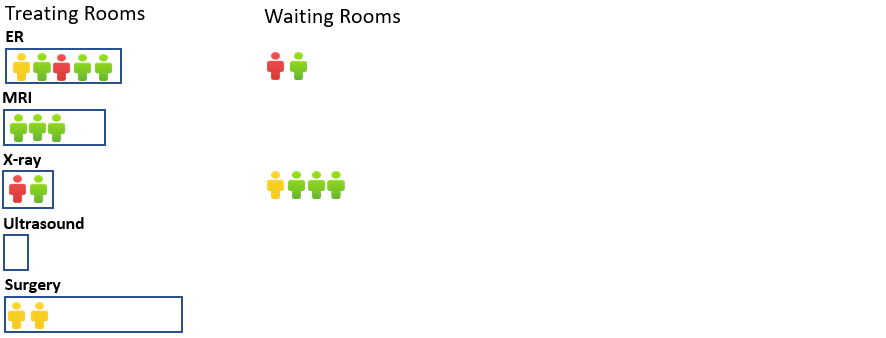
Each department has limited facilities, so it maintains its own waiting room and treatment room.
For example, the state at a given time tick might be as follows (note this uses different maximum patients per department than recommended):
Extend your program to handle the more realistic simulation by doing the following:
Complete the
Department class as described above. The constructor takes three parameters: the department name, the maximum number of Patients allowed in its treatment room, and a boolean specifying the queue type.
Note: The template for
Department is mostly empty: You will need to define your own methods to make the class functional.
Copy your code from
HospitalERCore.java into
HospitalERCompl.java and modify it to use a collection of
Departments instead of
a single treatment room and wating room.
* For marking purposes, you must follow these rules: *
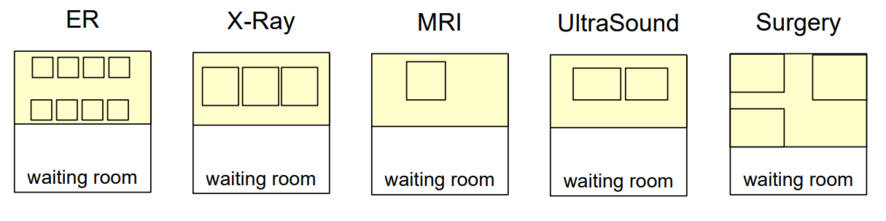
- The department names must be exactly: "ER", "X-Ray", "MRI", "UltraSound", and "Surgery".
- The maximum number of patients must be: 8 for "ER", 3 for "X-Ray", 1 for "MRI", 2 for "UltraSound", and 3 for "Surgery".
Make the
run() method in your
HospitalERCompl class do the following:
- Advance the time by one "tick".
- For each department, find all patients who have finished their current treatment:
- Remove them from the department and their treatment plan.
- If they have completed all their treatments, discharge them.
- Otherwise, move them to the next department according to their treatment plan.
- Process one time tick for each patient currently being treated or waiting in the waiting room in every department.
- For each department, move patients from the waiting room into the treatment room if there is space.
- Get any new patient that has arrived and add them to the appropriate department for their first treatment.
Challenge:
The goal of a simulation like this is to be able to evaluate and/or design a real system. For the Emergency Room, we might want to assess how well it is performing—for example: How long do patients have to wait? Are critical patients at risk due to long waits? Which departments become overloaded and may need additional resources? Alternatively, we might want to explore what kinds of situations (such as different arrival rates, distributions of priorities, or types of injuries) place the most stress on the emergency room.
Add more record-keeping and reporting to the system so that users can evaluate how well the emergency room performs under different conditions. You will need to update the
Patient class to print more useful information and possibly store additional data. You should also complete the
reportStatistics method to generate a meaningful report—ideally including graphical as well as textual information—about the emergency room’s performance.

You may need to modify the
GenerateRandomTreatments method in
PatientGenerator to allow the user to vary the types of patients generated.
The challenge is essentially a Data Science task: writing code that generates data and presents or visualises it in a way that is useful to a human analyst. This is a common purpose of simulation programs.
Part 2: Minesweeper Game (Weight: 30%)
Minesweeper is a
very old video game in which the player tries to work out where the mines are
hidden on a grid. Each square in the grid starts off as hidden (dark blue). The
player can mark any hidden square that they think contains a mine, and can expose
any hidden square that they think is safe.
- If the player exposes a square with a mine, they lose and the game is over. In this case, all the squares are opened up so that the player can see where all the mines are.
- If the player exposes a safe square that is next to one or more mines, then the square displays a number saying how many of the eight surrounding squares contain a mine.
- If the player exposes a safe square that is not next to a mine, then it "spreads" to all the connected squares that are also safe, and exposes them also.
The
Minesweeper class has code for most of the program, except for the key
methods of
-
mark(row, col): [incomplete] The player has clicked on a square to mark it.
-
tryExpose(row, col): [incomplete] The player has clicked on a square to expose it. Check first if it is a mine, or is already marked or exposed.
-
exposeSquareAt(row, col): [incomplete] The square at (row,col) isn't a mine. If it isn't exposed already, expose it now and if it has no adjacent mines, spread the exposure to all 8 neighbouring cells (recursively).
-
hasWon(): [incomplete] Check whether the player has won the game yet : have all the squares without a mine been exposed. It doesn't matter whether the squares with a mine have been marked or not.
The
Square class has code for individual squares; you need to use it, but you
should not modify it.
Core and Completion:
Complete the four incomplete methods in
Minesweeper in order to make the game work.
Challenge
Construct an AI helper that helps you play the game and does all the hard work for you. Of course, it should only be able to see what the player can see, rather
than cheat by looking inside the game.
Write a non-cheating method that can do what a good player would:
- It should be passed a 2D array of integers representing the visible state of the Minesweeper board. It should have -1 for each hidden square, 0 for each empty exposed square, and 1 - 8 for each exposed square that has adjacent mines.
- It should then work out which of the hidden squares are safe to expose and which of the hidden squares should be marked.
To test your AI helper, you will need to get the grid of numbers for the visible state,
and then draw the recommended actions on the board.
