
XMUT103
Assignment 5: General Tree
 Due 6 June , 19 pm
 Download the zip file and unpack it.
⚠️
Download the zip file and unpack it.
⚠️ To submit
- OrganisationChart.java and Position.java
- CPNCalculator.java
-
Do not rename the provided template files. This is important for the submission system to recognize your files correctly. -
You must use the provided template file and not remove or change the This ensures that the tutors can mark your work.setupGUIandmainmethods. -
Make sure all your files compile correctly before submitting. Files that do not compile may result in a zero mark for that question. - To submit your assignment, use this link.
Part 1: OrganisationChart (Weight: 50%)
Many organisations use a hierarchy, with the CEO at the top and all other positions arranged below them in a management hierarchy. Your task is to complete theOrganisationChart program. This program
allows users to view and edit an organisation's structure as a tree diagram,
where the CEO is the root. The links in the tree represent the management structure.
The main data structure is a general tree of Position objects. The tree structure is stored directly inside the fields of the Position objects.
Each Position has fields for: - information about the role
- a manager - the Position this Position reports to (the root has no manager)
- a team - a set of other Positions that report to this Position (possibly an empty set)
 Note that each node in this tree has links to both its child nodes and its parent node (the manager). This makes it easier to "move around" the tree, but it makes modifications more difficult because you must update both the upward and downward links.
The user can modify the organisation chart by:
Note that each node in this tree has links to both its child nodes and its parent node (the manager). This makes it easier to "move around" the tree, but it makes modifications more difficult because you must update both the upward and downward links.
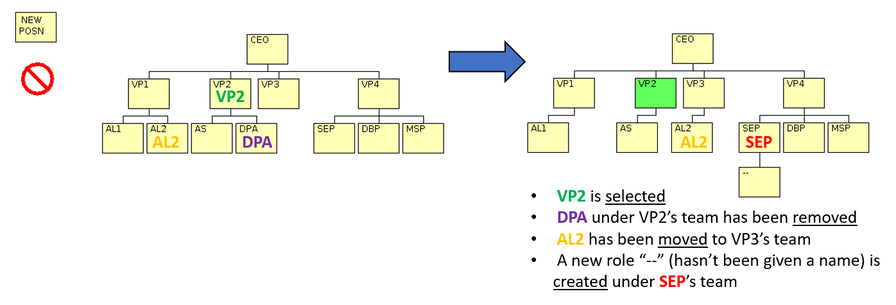
The user can modify the organisation chart by: - Selecting a Position clicking on the Position. The selected Position becomes highlighted.
- Renaming a Position Selecting the Position then typing the new role name in the "Change Role" textfield.
- Removing a Position Dragging the Position to the "remove" icon.
Only Positions that have no team members (child nodes) can be removed. - Moving an existing Position to be under a different manager Dragging the Position to the new manager.
All the Position's team members (the whole subtree) will move with the Position.
(note, you shouldn't be able to move a Position to be managed by a Position in the subtree under the Position.) - Creating a new Position Dragging the New Position icon to its new manager.
- Changing the horizontal location of a Position Dragging the Position to an empty space.
| Mouse Pressed | Mouse Released | Action | Conditions |
|---|---|---|---|
| on "new" icon | on a target Position (SEP) | create a new Position and add it to target's team | none | on a Position (VP2) | same Position (VP2) | select Position | none | on a Position (AL2) | another target Position (VP3) | add Position to target's team | cannot move to within its own subtree | on a Position (DPA) | on remove icon | remove Position from tree | Position must have no team | on a Position | on empty space | move Position left or right (to the empty space) | none |
Core (70%)
The Core involves completing the core functionality of drawing and editing the tree. You should do it in two steps. Read the comments in the template code to know what the methods should doStep 1: Adding Positions and drawing the tree.
-
addToTeam(Positionclass) -
drawTree(OrganisationChartclass)
Step 2: adding, moving and removing positions
-
removeFromTeam(Positionclass) Note: Only Positions that have no team members can be removed. -
findPosition(OrganisationChartclass) -
addNewPosition(OrganisationChartclass) -
movePosition(OrganisationChartclass) [version a] -
removePosition(OrganisationChartclass)
Completion (20%)
The Completion part adds an important check when moving positions around: a position must not be moved into its own subtree.-
inSubtree(OrganisationChartclass) -
movePosition(OrganisationChartclass) [version b]
Challenge (10%)
The Challenge part involves extending the program in several useful ways:- Extend the program to save the current hierarchy to a file, and to load a hierarchy from a file.
 You must design a file format that allows the tree to be reconstructed. It helps to know how many positions are in a manager’s team before reading them.
- Fix the
drawTreemethod so that it automatically spaces all positions evenly and neatly. At the moment, the program draws all positions at the correct vertical level, but leaves the horizontal positioning of team members to the user.
Use a post-order depth-first traversal to calculate the correct horizontal offsets. For each subtree, return its total width to position the parent and its team correctly.
- Add animation to the dragging, so the user can see the position moving as they drag it.
Part 2: CPN Calculator (Weight: 50%)
For this program, your task is to complete a calculator. This calculator uses a range of operators, and allows some operators to have more than two operands (the values that the operator uses). It uses "Cambridge Polish Notation". This notation follows two rules:- The operator always comes before its operands.
- Every operator and its operands must be enclosed in round brackets.
This is a multiplication operator applied to four operands:
- The first operand (in the yellow box) is the sum of 4, 8, 3, 7 and 2 (sum is 24).
- The second operand (in the red box) is 7.
- The third operand (in the green box) is 20 divided by 2 then divided by 5.
- The fourth operand (in the red box) is 18.
 The calculator must support the following operators:
 -
+, which adds up all its operands. -
-, which takes the first operand and subtracts all remaining operands from it. -
*, which multiplies all its operands. -
/, which takes the first operand and divides it by all remaining operands. -
^, which takes exactly two operands and calculates the first to the power of the second. For example, ( ^ 2 3 ) calculates 2 to the power of 3, which is 8. -
sqrt, which calculates the square root of its single operand. -
logcalculates the log (base 10) of its single operand. If given two operands, it calculates the log of the first operand using the second operand as the base. -
lncalculates the natural log (base e) of its single operand. -
sin,cos, andtan, which compute the standard trigonometric functions of their single operand. -
dist, which calculates the Euclidean distance. It can take either:- Four operands (x1, y1, x2, y2) to compute the euclidean distance between the 2D points (x1,y1) and (x2,y2).
- Six operands (x1, y1, z1, x2, y2, z2) to compute the euclidean distance between the 3D points (x1,y1,z1) and (x2,y2,z2).
-
avg, which computes the average of all its arguments (supports any number of operands, but requires at least one).
-
PI, which has the value Math.PI (3.14159...) -
E, which has the value Math.E (2.71828..., the base of natural logarithms)
- The GUI set up,
- The top level REPL structure (a Read Evaluate, Print Loop that reads an expression, evaluates it, and prints the result.
- A parsing method: This method reads an expression from the user and turns it into a general tree structure.
- The
GTNodeclass: Defines a simple, generic tree node. Each node holds one data item and a list of its child nodes(representing the root of a sub-expression). - The
ExpElemclass: Defines the expression elements (the operators, constants, or numbers) that are stored as the data item inside aGTNode.
evaluate method which evaluates an expression tree.
Draw the tree structure for an expression such as
( + ( * 5 10) 100 ( / PI 2 ) ) showing the GTNode's and
the ExpElem's.
Core (70%)
Make the calculator work on expressions with the operators +, -, *, and /, and the constants PI and E.
You need to complete the evaluate(..) method to evaluate an
expression and return the value: - If the node is a number
return the value of the number - If it is a named constant
return the appropriate value - If is an operator node with children
(recursively) evaluate all the children, and then apply the operator to their values, and return the answer.
Completion (20%)
Extend your evaluate method: - Handle all remaining operators. You will find methods in the Math class to be useful.
- Check for unknown operators: if an expression contains an invalid operator, evaluate should report the error (eg, The operator $ is invalid) and return the special double value Double.NaN.
- Check that an operator has a valid number of operands; if not report the error, and return Double.NaN
- The arithmetic operators and avg allow any number of operands greater than 0. eg
( + 5 )is OK and means just 5;
- dist must have four or six operands
- log must have one or two operands
- The other operators have a fixed number of operands.
- The arithmetic operators and avg allow any number of operands greater than 0. eg
Challenge (10%)
Extend readExpr(): Add error checking to your parsing method to handle the following cases: - Check for empty brackets (ie
( )). Report the error and return a null tree. - Check for invalid expressions where the opening and closing brackets do not match.
Add a printExpr method that will print the expression using normal infix for +, -, *, and /^, using brackets only when necessary, and using normal brackets notation for the other functions. For example -
( + 7 6 ( * 5 4 ) ( * 3 2 1 ) ( ^ 2 5 ) )prints as7+6+5*4+3*2*1+2^5 -
( * 7 6 ( + 5 4 ) ( + 3 ( ^ 2 5 ) 1 ) )prints as7*6*(5+4)*(3+2^5+1) -
( + 3 ( sin ( + 4 ( * 5 PI ) ) ) ( ln 6 ) )prints as3+sin(4+5*PI)+ln(6)
Appendix.
Sample output for CPNCalculator on the test-core.txt file:
expr: 20
 -> 20.0

expr: ( + 7 6 ( * 5 4 ) ( * 3 2 1 ) )
 -> 39.0

expr: ( * 7 6 ( + 5 4 ) ( + 3 2 1 ) )
 -> 2268.0

expr: ( - ( * 2 4 ) ( / 2 4 ) )
 -> 7.5

expr: ( - 24 2 3 4 )
 -> 15.0

expr: ( / 24 2 3 4 )
 -> 1.0

expr: ( * 2 PI 10 )
 -> 62.83185307179586
Sample output for CPNCalculator on the test.txt file:
expr: ( + 50 ( log ( * 125 8 ) ) )
 -> 53.0

expr: ( ^ 2.718282 ( ln 20 ) )
 -> 20.00000378099725

expr: ( ^ ( ^ 2 5 ) 2 )
 -> 1024.0

expr: ( ^ 10 ( log 38 ) )
 -> 37.99999999999999

expr: ( + ( sin ( / 3.14159 3 2 ) ) ( cos ( / 3.14159 3 ) ) ( tan ( / 3.14159 4 ) ) )
 -> 1.9999990562184347

expr: ( dist 0 0 3 4 )
 -> 5.0

expr: ( dist 0 0 0 3 4 12 )
 -> 13.0

expr: ( avg 1 2 3 4 5 6 7 8 9 10  )
 -> 5.5

expr: ( +  3 ( sin ( / PI 6 ) )  ( log ( * 125 8 ) ) )
 -> 6.5

expr: ( ^ E ( ln 20 ) )
 -> 19.999999999999993

expr: ( + ( sin ( / PI 3 2 ) ) ( cos ( / PI 3 ) ) ( tan ( / PI 4 ) ) )
 -> 2.0

expr: ( log 64 4 )
 -> 3.0

expr: ( The remaining examples should all be errors )
The is not a valid operator.
 -> NaN

expr: ( + 1 2 3 4
Missing closing bracket
 -> NaN

expr: ( log 64 2 2 )
Too many operands for log
 -> NaN

expr: ( dist 1 2 3 )
Wrong operands for dist
 -> NaN

expr: ( dist 1 2 3 4 5 )
Wrong operands for dist
 -> NaN

expr: ( dist 1 2 3 4 5 6 7 )
Wrong operands for dist
 -> NaN

expr: ( power 5 7 )
power is not a valid operator.
 -> NaN