XMUT103
Assignment 6: Graphs
 Due 20 June , 19 pm
 Download the zip file and unpack it.
⚠️
Download the zip file and unpack it.
⚠️ To submit
- BusNetworks.java (and Town.java if you modified it)
- MazeSearch.java
-
Do not rename the provided template files. This is important for the submission system to recognize your files correctly. -
You must use the provided template file and not remove or change the This ensures that the tutors can mark your work.setupGUIandmainmethods. -
Make sure all your files compile correctly before submitting. Files that do not compile may result in a zero mark for that question. - To submit your assignment, use this link.
Part 1: Bus Networks (Weight: 50%)
BusNetworks is a program for analyzing a network of long-distance bus services. The network consists of nodes (representing towns in the region) and links (representing a direct bus connection between a pair of towns).
The program reads the network data from a text file: - The first line contains a list of all the town names in the region.
- Each remaining line contains two town names, showing a direct bus connection between them.
"data-small.txt" file has just 7 towns and six
direct bus services:
   Auckland Hamilton Napier NewPlymouth PalmerstonNorth Wellington Whanganui
   Auckland Hamilton
   Hamilton Napier
   Hamilton PalmerstonNorth
   NewPlymouth Whanganui
   Napier PalmerstonNorth
   PalmerstonNorth Wellington
The program uses a graph data structure consisting of two classes:
- The
Townclass (already written for you) represents the nodes of the graph. Each Town object stores the town's name and a set of its neighbours (the towns it has a direct bus connection to). - The
BusNetworksclass represents the network itself. This class contains the main data structure (the graph) and all the methods you need to implement.
- Loading a network from a text data file.
- Printing the list of all towns and their direct connections.
- Listing all towns that are reachable from the input town.
- Identifying all connected groups of towns in the network.
Core (70%)
Complete the loadNetwork method.This method is passed the filename as a parameter. It must read the data from the text file and construct the graph representing the towns and their connections.
The
busNetwork field must be a Map containing all the towns in the network. The map keys must be the town names (String), and the map values must be the corresponding Town objects.Note: The network may include towns that are not all connected to each other.
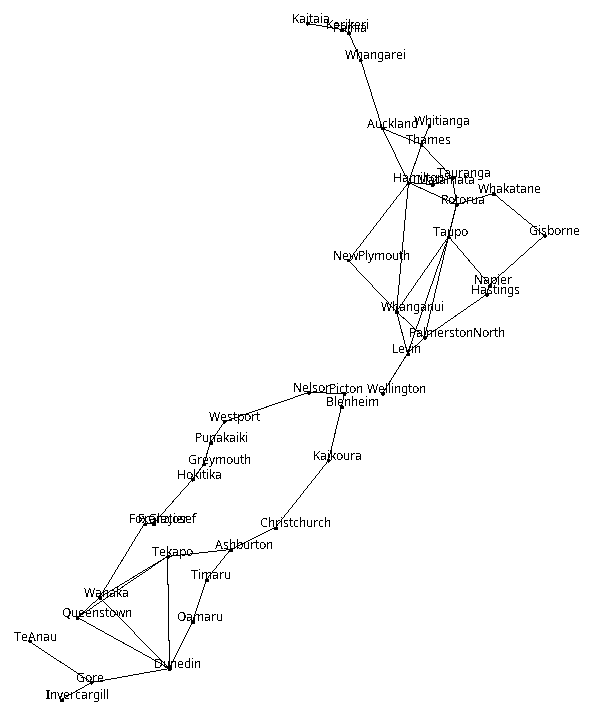
 There is a diagram showing the full layout of the large bus network at the end of the assignment.
Complete the
There is a diagram showing the full layout of the large bus network at the end of the assignment.
Complete the printNetwork method.This method should print out the entire network by printing one line for each town, showing the name of the town followed by the names of its neighbours.
- Note:
printNetworkdoes not need to traverse the graph; it can simply loop through the collection of towns stored in thebusNetworkmap. - The towns and their neighbours can be printed in any order.
The current network:
====================
Auckland-> Hamilton
Hamilton-> Auckland PalmerstonNorth Napier
Napier-> PalmerstonNorth Hamilton
NewPlymouth-> Whanganui
PalmerstonNorth-> Wellington Hamilton Napier
Wellington-> PalmerstonNorth
Whanganui-> NewPlymouth
Completion (20%)
Complete the findAllConnected method.
This method must return a Set of all Town objects that are connected to a specified starting town. - Traverse the network from the starting town using a standard graph traversal algorithm.
- Use a
visitedset to keep track of where you have been, and return this set at the end. - Hint: You will need to write a recursive helper method to handle the traversal.
Complete the printReachable method.
Given the name of a town, this method must print all other towns that can be reached from it via the network. - It must call your
findAllConnectedmethod to get the set of connected towns. - Note: Do not include the starting town itself in the printed output list.
Complete the printConnectedGroups method.
This method must find all independent, connected groups of towns in the network and print each group on a separate line. - It should repeatedly use the
findAllConnectedmethod to discover all the towns belonging to a particular connected component. - For example, for the "data-small.txt" file, there are two separate groups of towns that are not connected to each other, so it could print:
Connected Towns
===============
Group 1: Auckland Hamilton PalmerstonNorth Wellington Napier
Group 2: NewPlymouth Whanganui
Challenge (10%)
Extend the program to display the network of towns graphically. - Use the file
data-with-lat-long.txt. It contains the same network data asdata-big.txt, but in a different format: it begins with the total number of towns, followed by one line per town that includes its name and its latitude/longitude coordinates. - This location information will be useful for positioning the towns on the screen.
- Bonus feature: Ideally, the graphical interface should allow the user to click on a town and automatically highlight the entire part of the network (both the towns and the bus links) that can be reached from that chosen town.
Part 2: Maze Search (Weight: 50%)
TheMazeSearch program creates mazes and then finds a path through the maze from any square the user clicks on to the goal square (shown in green).
The maze is represented as a graph of MazeCell objects, where each MazeCell corresponds to one square of the maze and contains a collection of neighbouring MazeCells that are directly connected to it.
The part of the program that generates the maze is already written for you. Your task is to write the search methods that find a path through this graph to reach the goal MazeCell.
Core (70%)
Complete the exploreFromCell method.
This method uses a recursive depth-first search (DFS) to find a path from the input cell to the goal cell.
If the method encounters a cell it has not visited before, it should execute the following steps in order: - Visit the cell: Call the
cell.visit()method. - Colour it yellow: Call the
cell.draw(Color.yellow)method. - Pause: Pause for a brief delay to animate the search.
- Explore neighbours: Recursively call exploreFromCell on each of the cell's neighbours.
- If exploring any neighbour succeeds in finding a path to the goal, immediately return true.
- If all neighbours fail to find a path, the cell is a dead end. Colour the cell red using
cell.draw(Color.red)and return false.
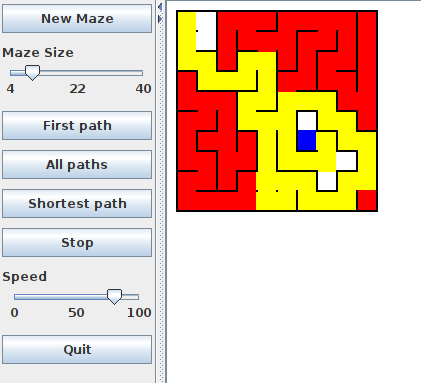
- The yellow cells indicate the path taken.
- The blue cell is the goal.
- The red cells mark parts of the maze that led to dead ends during the search.
| Find a Path | Find Shortest Path |
|---|---|
 |
 |
Completion (20%)
Complete the exploreFromCellAll method.
This method must search for all possible paths from the input cell to the goal cell.To find multiple paths, your algorithm must systematically reset the cells it has visited so they can be reused in alternative routes:
- As it visits each cell, it should colour it yellow and pause briefly.
- After it has finished exploring all of a cell’s neighbours—regardless of whether a path was found—it must unvisit the cell and colour it white again. This ensures the cell is available to be part of a different path branch.
- Whenever the method reaches the goal MazeCell, it should pause for 1000 milliseconds to show the completed path. To visually highlight that a path has been found, colour the goal cell blue before pausing, and return it to green afterwards.
- The method must never attempt to explore beyond the goal cell.
Challenge (10%)
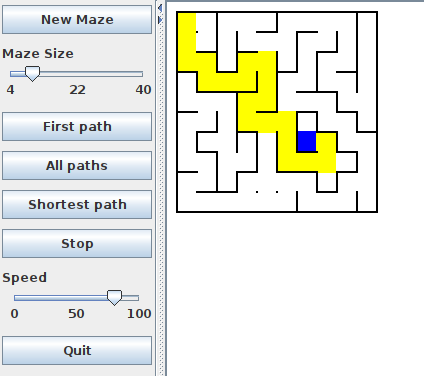
Complete the exploreFromCellShortest method.This method must find and display the shortest path from the starting cell to the goal. It should not colour any cells while searching. Instead, once the goal is reached, it should colour all the cells along the path that led to the goal. To do this, the method must record the path as it explores, for example by keeping track of the cell it came from each time it visits a new cell. The right hand image above shows the shortest path from the top-left corner to the goal.
Appendix.
- network-layout.png: