
XMUT103
Assignment 4: Analysing and Measuring Sets, Binary Trees, Sorting and lambdas
 Due 23 May , 19 pm
 Download the zip file and unpack it.
⚠️
Download the zip file and unpack it.
⚠️ To submit
- Report.pdf
- MorseCode.java
- EarthquakeSorter.java and Earthquake.java
-
Do not rename the provided template files. This is important for the submission system to recognize your files correctly. -
You must use the provided template file and not remove or change the This ensures that the tutors can mark your work.setupGUIandmainmethods. -
Make sure all your files compile correctly before submitting. Files that do not compile may result in a zero mark for that question. - To submit your assignment, use this link.
Part 1: Analysing and Measuring Sets (Weight: 15%)
This question is about measuring the costs of finding the number of unique words in a given file of words. We use three different types of collections (ArrayList, HashSet, and TreeSet) and compare their efficiency. The fileVocabularyMeasure.java includes methods that measure how long it takes to find the number of unique words for each of these three collection types. Each method takes a filename as a parameter, so you can try different numbers of words.
Read and understand the code in VocabularyMeasure.java.
Run the tests by pressing the All button.
This will run all methods (analyseList, analyseHSet, analyseTSet)
on all files.
Write a brief report (submit as Report.pdf) that includes:
a. An analysis of the costs for each collection using O(...) notation.
a. A graph comparing all three collections (ArrayList, HashSet, TreeSet) as the number of words increases. Put number of words on the x-axis and time in seconds on the y-axis. This will let you see how each collection performs compared to the others.
a. Document your conclusions in the report, explaining what you observed and how you arrived at them.
(a): ArrayList
If you used anArrayList with n items, what would be the cost?
(Express the cost in Big-O notation in terms of n).
 Hint: For each line, work out
 - The cost of executing that line once, and
- The number of times (worst case) it will be executed.
int count = 0;                                          // cost= O(  ) times=
List<String> vocab = new ArrayList<String>();           // cost= O(  ) times=
    try{
        Scanner sc = new Scanner (Path.of(fname));      // cost= O(  ) times=
        while (sc.hasNext()){
            String word = sc.next();                    // cost= O(  ) times=
            count++;                                    // cost= O(  ) times=
            if(!vocab.contains(word)){                  // cost= O(  ) times=
                vocab.add(word);                        // cost= O(  ) times=
            }
        }
        sc.close();                                     // cost= O(  ) times=
    }catch(IOException e){UI.println("bad"+e);}
UI.printf("Words = %,10d  Vocab = %,d\n", count, vocab.size());

                                                        // Total Cost = O( )
(b): HashSet
If you used aHashSet with n items, what would be the cost?
(Express the cost in Big-O notation in terms of n).
int count = 0;                                          // cost= O(  ) times=
Set<String> vocab = new HashSet<String>();              // cost= O(  ) times=
    try{
        Scanner sc = new Scanner (Path.of(fname));      // cost= O(  ) times=
        while (sc.hasNext()){
            String word = sc.next();                    // cost= O(  ) times=
            count++;                                    // cost= O(  ) times=
            vocab.add(word);                            // cost= O(  ) times=
        }
        sc.close();                                     // cost= O(  ) times=
    }catch(IOException e){UI.println("bad"+e);}
UI.printf("Words = %,10d  Vocab = %,d\n", count, vocab.size());

                                                        // Total Cost = O( )
(c): TreeSet
If you used aTreeSet with n items, what would be the cost?
(Express the cost in Big-O notation in terms of n).
int count = 0;                                          // cost= O(  ) times=
Set<String> vocab = new TreeSet<String>();              // cost= O(  ) times=
    try{
        Scanner sc = new Scanner (Path.of(fname));      // cost= O(  ) times=
        while (sc.hasNext()){
            String word = sc.next();                    // cost= O(  ) times=
            count++;                                    // cost= O(  ) times=
            vocab.add(word);                            // cost= O(  ) times=
        }
        sc.close();                                     // cost= O(  ) times=
    }catch(IOException e){UI.println("bad"+e);}
UI.printf("Words = %,10d  Vocab = %,d\n", count, vocab.size());

                                                        // Total Cost = O( )
Part 2: Morse Code (Binary Trees) (Weight: 60%)
Morse Code is a system for representing letters and other symbols using
sequences of short and long sounds or signals, known as dots and dashes.
For example, the letter C is written in Morse Code as "-.-."
(dash dot dash dot). It was developed by Samuel Morse and was widely used
in the early days of communications, for example, to send messages
(telegrams) via telegraph and wireless technology.
The International Morse Code covers the 26 letters of the English alphabet
(A to Z), the digits 0 to 9, some additional non-English letters, and a few
punctuation and procedural signals. More details can be found on the
Wikipedia page for Morse Code: https://en.wikipedia.org/wiki/Morse_code.
One way of representing Morse code is as a binary tree. The Wikipedia page
has an example of such a tree:
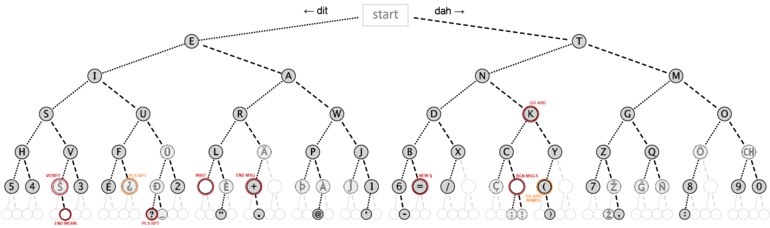 Using the binary tree, a code can be decoded by following a path down the tree. Start at the root,
and for each character in the code, move left if it’s a dot and right if it’s a dash. The node you
end up at will represent the symbol encoded by the code.
For this question, you will complete a program that uses a binary tree to implement an encoder and
decoder for Morse Code.
Using the binary tree, a code can be decoded by following a path down the tree. Start at the root,
and for each character in the code, move left if it’s a dot and right if it’s a dash. The node you
end up at will represent the symbol encoded by the code.
For this question, you will complete a program that uses a binary tree to implement an encoder and
decoder for Morse Code. - Each node in the Morse Code tree contains a symbol and two child nodes - the
dotChildand thedashChild - The code for the symbol in a node is the sequence of dots and dashes along the path from the root to that node.
SymbolNode class to represent the nodes in the tree.
The file SymbolNode.java is already complete and defines the constructors,
getters, setters, and a draw method.
The MorseCode class is the main program. The setupGUI() method has already been
written for you and sets up the user interface for the methods that you need to complete.
The MorseCode class also initializes the tree with 6 predefined codes and symbols, and
includes a utility method to check if a code is a valid sequence of dots ('.') and dashes ('-').
 A code is a string consisting only of dots ('.') and dashes ('-'). You can test
whether the i'th character in the code is a dot or a dash like this:
A code is a string consisting only of dots ('.') and dashes ('-'). You can test
whether the i'th character in the code is a dot or a dash like this:
      char c = code.charAt(i);
      if (c=='.'){....} else {....}
Core (70%)
You should complete the following methods:
- The
decode(String code)method should decode a code (find the corresponding symbol) by following the path down the tree from the root. For each dot ('.') or dash ('-') in the code, move left or right along the tree. When you reach the SymbolNode at the end of the path, print out the symbol in that node.
For example, given the initial basic tree, decoding ".-" withdecode()should print .- corresponds to A .
Ifdecode()reaches a point where there is no node (i.e., it runs off the end of the tree), it should print There is no symbol for that code
- The
printTree()method should print out the entire tree, using indentation to show the tree structure. It should be implemented recursively: first, print the text in the current node, then (if the node has children) print the dot subtree, followed by the dash subtree.
You will need to write a helper method, printTree(SymbolNode node, String indent), that takes two arguments: the node to print and an indentation string. The indentation string will build up on each recursion to visually represent the tree structure.
For example, the basic tree should be printed as:
    =
      . = E
        .. = I
        .- = A
      - = T
        -. = N
        -- = M
- The
addCodeCore()method allows the user to add a new code (and its corresponding symbol) to the tree, as long as it can be added just below an existing node.
The method starts at the root of the tree and works its way down, following the dot or dash nodes according to the sequence in the code, until it reaches the location for the last node in the path.- If there isn’t a node where the last node should be, it will ask the user for the symbol to add and place a new node with that symbol in the correct position.
- If there is already a node at the end of the path, it should report that the code is already in the tree.
- If it encounters a null node before reaching the end of the code sequence, it should print: Can't add this code to the tree and stop executing.
For example, - If the method is adding the code ".-." and the tree already has the node for ".-" (A) but doesn't have a node for ".-.", it should step down to the node with A, then ask the user for the new symbol (which should be R) and add a new
dotChildnode with the symbol R. - If the method is adding the code ".-.." and the tree has the node for ".-" but doesn’t have a node for ".-.", then it should not attempt to add the node for ".-..". Since adding ".-.." would require adding ".-." first, the method should report this and not proceed with adding the new node for ".-..".
Printing the tree after adding the code ".-." for the symbol R should now produce:
    =
      . = E
        .. = I
        .- = A
          .-. = R
      - = T
        -. = N
        -- = M
Completion (20%)
You should complete the following methods:
- The
addCodeCompl()method allows the user to add any new code, whether there is currently a path leading to it or not.
LikeaddCodeCore, it starts at the top (root), and works its way down the tree following the dot or dash nodes according to the given sequence of the code, but if an intermediate node does not exist, it will create the missing node with a null symbol. - The
loadFile()method loads a collection of symbols and their corresponding codes from a file. You can use morse-code.txt, which contains the full alphabet and digits, or mini-tree.txt, which includes a reduced set with just 8 symbols and their codes. Each line in the file contains a symbol and its corresponding Morse code.
Challenge (10%)
You should complete the following methods:
- The
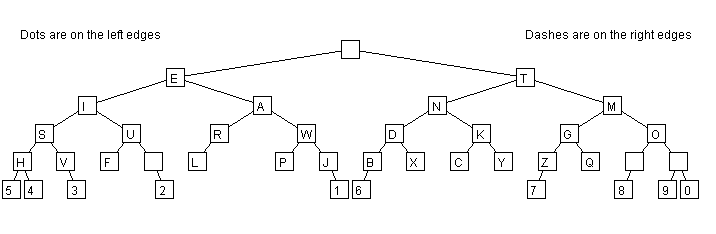
drawTree()method displays the tree in the graphics window. Each node is drawn as a rectangle with text inside, and lines are used to connect parent nodes to their child nodes, visually representing the structure of the tree. See a simple example below:
- The
encode(String symbol)method prints the Morse code sequence associated with a given symbol. It searches the tree for a node containing that symbol, reconstructing the sequence of dots and dashes that leads to the symbol, and then outputs the corresponding Morse code.
For example, with the full tree, encode("Z") should output "--..".
Part 3: Earthquake Sorter (25%)
TheEarthquake Sorter program is a tool for sorting and analysing earthquake data from New Zealand.
The program has two classes:
- The
Earthquakeclass represents one earthquake. It is mostly complete and includes:- A constructor
-
Gettermethods for each field (ID, depth, magnitude, region, date, etc.) -
distanceTo(Earthquake other): Calculates the distance between this earthquake and the other earthquake -
distanceTo(double latitude, double longitude): Calculates the distance between this earthquake and a given latitude and longitude. -
toString(): Returns a formatted string of the earthquake data. -
compareTo: Provides the default ordering (by ID). You will need to complete this method.
- The
EarthquakeSorterclass handles the user interaction and stores the list of earthquakes. It contains the methods for sorting the data by ID, magnitude, date and time, region, and location.
Core (70%)
Complete the following methods:
In Earthquake.java: -
compareTo: Provides a natural ordering based on the ID.
Use a method from the String class to compare the ID strings.
In EarthquakeSorter.java: -
loadData: Loads the data from a file and stores it in the list of earthquakes.- Each line of the data file is one earthquake.
- File format: ID date time latitude longitude magnitude depth region
- Create an
Earthquakeobject for each line and add it to the list.
-
sortByID: Sorts the list of earthquakes by their IDs. -
sortByMagnitude: Sorts the earthquakes by magnitude, largest first.
Completion (20%)
Complete the following methods in EarthquakeSorter.java:
-
sortByTime: Sorts the earthquakes by date and time, with earlier events first. -
sortByRegion: Sorts earthquakes by region.- Within a region, earthquakes are sorted by magnitude (highest first).
- If two earthquakes have the same region and magnitude, they are sorted by depth (shallowest first).
Challenge (10%)
Complete the following method in EarthquakeSorter.java:
-
sortByProximity: Asks the user for a latitude and longitude and then sorts the earthquakes by distance to that location, with closer earthquakes first.
Make use of the distanceTo method in Earthquake.java.
Extra information
Note 1: ValidationWe have provided output examples for each of the sorting methods, based on the
bigearthquake-data.txt file. Use these to check your code and make sure that it is outputting data in the right order. EG: -
output-ID.txtlisting by ID. -
output-Magnitude.txtlisting by Magnitude. -
output-Time.txtlisting by date and time -
output-Region.txtlisting by region, and magnitude then depth within region -
output-Proximity-ChCh.txtlisting by proximity to Christchurch (location -43.5321, 172.6362)
If you select "Set Input" from the UI frame's MENU then choose chch.txt, the UI will automatically input the latitude and longitude for Christchurch. This is very helpful for testing your
sortByProximity method!